BrandOffice version 39: Additional brand standards chart features

BrandOffice version 39: Additional brand standards chart features

Additional brand standards chart features

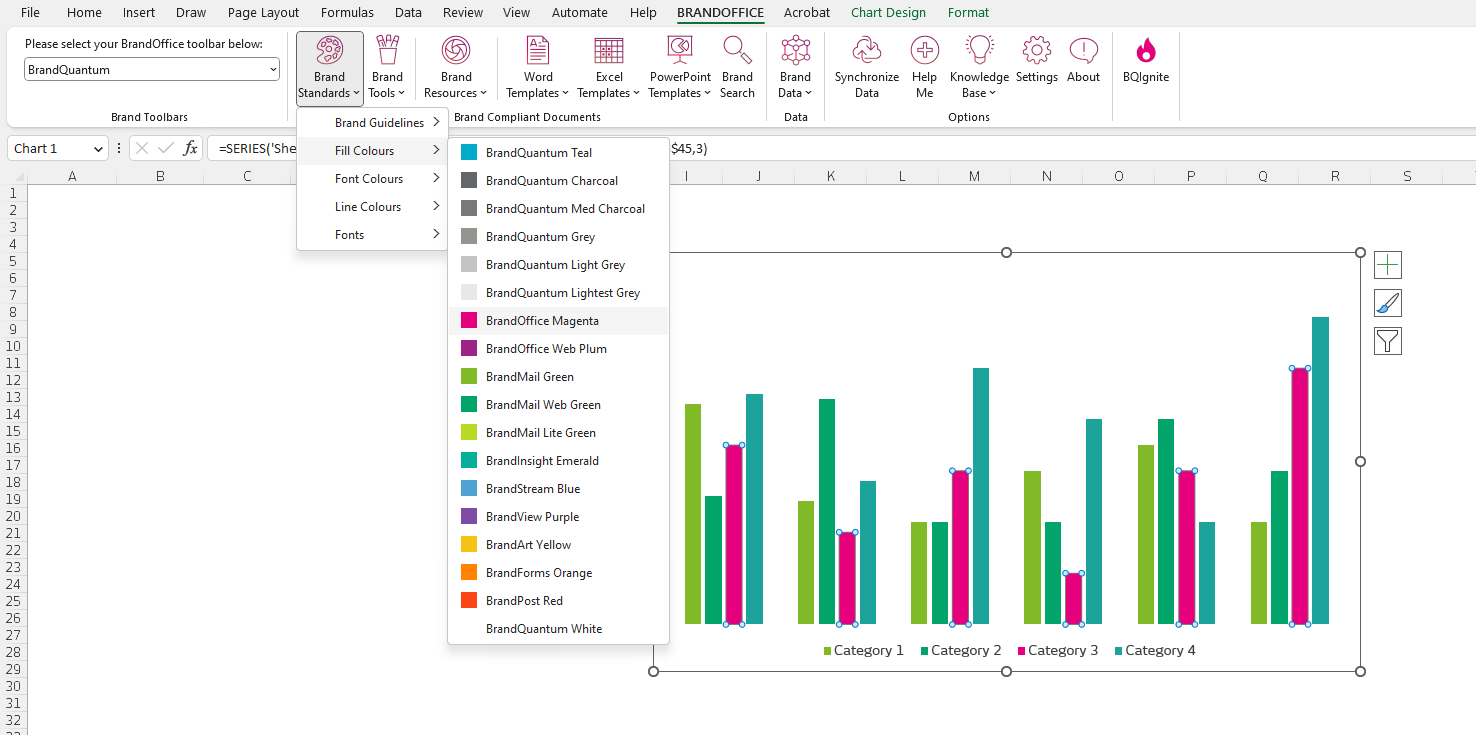
BrandOffice version 39 now supports additional brand standards application for Excel charts. Selecting individual series in charts, allows a user to apply fill colors from the BrandOffice toolbar:


    • Announcements

    • BrandOffice version 3.4.0.0: Brand Assist

      What's new in version 3.4.0.0? BrandOffice version 3.4.0.0 (Build 3.4.0.0) adds Brand Assist to help you create and check content in Word, Excel and PowerPoint. Brand Assist Brand Assist pane opens from the Assist ribbon button when your company has enabled
    • BrandOffice version 3.3.0.0: Search pane, Bios and Tombstones

      What's new in version 3.3.0.0? BrandOffice version 3.3.0.0 (Build 3.3.0.0) brings your synced brand content into a new Search pane and adds Bios, Tombstones and theme options. Search Search pane opens from the ribbon in Word, Excel and PowerPoint, bringing
    • BrandOffice version 60: PDF forms, connected folders and Style updates

      What's new in version 60? BrandOffice version 60 (Build 3.2.0.60) adds PDF forms and connected folders to your toolbar, plus more control when applying Styles. Toolbar content PDF forms open as fillable documents directly from the ribbon when published
    • BrandOffice version 59: Faster data syncing

      What's new in version 59? BrandOffice version 59 (Build 3.2.0.59) speeds up data syncing and keeps the progress window responsive during large syncs. Updates to this version Faster syncing completes full data rebuilds in under 20 seconds and day-to-day
    • BrandOffice version 57: Improved PDF export

      What's new in version 57? BrandOffice version 57 (Build 3.2.0.57) lets you export PDFs from cloud files with the correct filename and without comments or markup. Updates to this version Cloud PDF export lets you export files stored in SharePoint or OneDrive
    • Sticky Posts

    • BrandOffice version 51: Additional form updates

      What's new in version 51? BrandOffice version 51 includes minor bug fixes and enhancements to improve usability and stability. Updates to this version Maximum length setting added to textboxes, allowing better control over input limits. Prefix and suffix
    • BrandOffice version 49: New Data Forms and Company Functions

      BrandOffice version 49 is a major update that brings powerful new document automation features—Data Forms and Company Functions—alongside key stability improvements to streamline your content creation workflows. Data Forms in Word Embed centrally managed
    • BrandOffice version 41: Excel sheet inserts and Word content insert builder

      BrandOffice version 41 has some exciting new features: Excel sheet inserts If you are a regular Excel user, you may have the need to insert Excel sheets into your workbook. BrandOffice now accommodates sheet inserts. Administrators can load sheet inserts
    • BrandOffice version 39: Additional brand standards chart features

      Additional brand standards chart features BrandOffice version 39 now supports additional brand standards application for Excel charts. Selecting individual series in charts, allows a user to apply fill colors from the BrandOffice toolbar: